Active Directory hardening: Best practices
This guide to Active Directory hardening is hands-on and pragmatic, based on insights from decades of supporting Active Directory IT teams.
Published August 25, 2026:quality(90))
:quality(90))
:quality(90))
:quality(90))
If you're looking to defend against Active Directory security threats, Active Directory hardening is the place to start. This guide focuses on practical best practices drawn from decades of real-world experience supporting AD IT teams.
Active Directory hardening is a catch-all term for the work to shrink your directory attack surface, protect domain controllers and authentication protocols from abuse, and implement fundamentals like least privilege and AD tiering.
Ask any IT pro and they'll tell you that the threat landscape looks scarier than it did last year. AI is helping bad guys do more bad things, faster. Attack surface isn't shrinking. And making the case to invest in security for an on-prem or hybrid AD network isn't always easy. If you have these problems, the good news is you're clearly not the only one.
To an outsider, the popularity of Active Directory (AD) must look like a paradox. On the one hand, AD is still the world's most widely used on-premises identity platform, resisting even Microsoft urging customers to migrate to its Azure cloud. And yet, somehow, it has retained this status despite numerous well-documented security shortcomings which continue to cause cybersecurity problems even for large, well-resourced organizations.
Microsoft is not indifferent to the problem. The last decade has seen plenty of security upgrades, such as implementing LDAP and SMB v3 encryption by default, the deprecation of insecure NTLM authentication, and introducing Credential Guard to improve privileged credential security. The approach has been to softly, gently cajole admins to use AD in a more secure way rather than compel them to do so.
Meanwhile, admins who want to address AD's security weaknesses for themselves will find no shortage of advice. Some of these recommendations are second nature, for example implementing better authentication. However, beyond these obvious upgrades things get more complex as admins grapple with a bewildering number of possible fixes.
The road back to sanity is to understand the attack paths criminals use to target AD.
These almost always start with a move from a compromised lower-privileged AD account to one with higher privileges, such as an admin or service account. One answer, then, is to build a better wall around user accounts, but also to monitor the privileges and management systems surrounding higher-privileged accounts deeper inside the system.
There are so many good places to start (and we'll talk more about resources later). We particularly like how the Five Eyes security agencies (NSA, UK NCSC, Canadian CCCS, NCSC-NZ, and Australian ASD) articulate best practices for detecting and mitigating Active Directory compromises.
They begin by noting that "Active Directory’s susceptibility to compromise is, in part, because every user in Active Directory has sufficient permission to enable them to both identify and exploit weaknesses. These permissions make Active Directory’s attack surface exceptionally large and difficult to defend against."
The advice goes on to connect AD's vulnerability to a wide range of attack paths resulting from hidden trust relationships, complex object relationships, legacy configurations, delegated rights, and inherited permissions.
If the ability to exploit user accounts as privilege escalation paths is the external problem, the internal equivalent is the sheer complexity of managing AD itself. It is simply incredibly easy to go wrong and end up lost in a security maze that grows over time.
Many AD hardening suggestions are small tweaks, some of which IT teams will already have put in place. The point of a long list is that they work best when used together.
AD hardening can be categorized under three headings:
things you should already be doing;
things you might not be doing but should implement ASAP;
things you aren't doing at all because you assumed they weren't necessary.
Some of the hardening recommendations stray into wider security policy, such as network segmentation, not becoming over-reliant on EDR, and testing backups and disaster recovery. However, more AD-specific recommendations often include the below.
Implement multi-factor authentication (MFA) across all users, with phishing-resistant MFA for privileged accounts.
Establish a system for purging unused user accounts. Unmonitored identities can quickly become a liability.
Trace and banish legacy protocols, starting by turning off NTLM yesterday. This helps guard against NTLM Pass-the-Hash attacks.
Consider hardening access by using only Privileged Access Workstations (PAWs) for admin access.
Change passwords, but not too much. Otherwise, users will choose or reuse weak ones. It's safer to ensure that existing passwords meet the required policy, and add a second factor of authentication.
Make sure you have visibility on what policies you've applied, to whom or what they apply, and that you can prove they're working as intended.
Take a look at important Active Directory settings that may still be set to default, such as default domain policy and default domain controllers policy. Ensure they're not too permissive for your environment.
Secure service accounts by using Group Managed Service Accounts (gMSAs) that rotate long and complex passwords on a defined timescale. This, along with MFA and a robust password policy, can help protect against attacks like Kerberoasting.
Move from RC4_HMAC to AES-128 or AES-256 as soon as possible.
Credentials from a higher AD tier should never be exposed to a lower tier. Limit the computers privileged accounts can log on to administrative workstations and domain controllers.
Track user sessions in real time, and set up alerts on suspicious activity.
Map hidden attack paths and surface misconfigurations with open-source tools like BloodHound and PingCastle.
Consider Domain Controllers (DCs) as sacred. Patch promptly, limit network exposure, monitor privileged access, restrict interactive logons.
Guard against certificate abuse, a growing AD escalation path that you can address by implementing AD Certificate Services (ADCS) auditing.
Prioritize regular pentesting for Active Directory, including for many of the issues on this and other security hardening lists.
DCSync attacks try to grab new credentials from a Domain Controller by abusing replication rights. Address this by limiting which accounts have these permissions.
To summarize this advice:
The first layer of AD weakness is identity exposure (accounts unprotected by additional authentication or monitoring).
Behind this is a deeper layer of excessive privileges (enabling easier lateral movement),
the risk of which is amplified by configuration that drifts away from an ideal state over time.
These issues largely reflect AD's aging design, which is from an era when MFA was niche, AD installations were smaller and simpler, and the idea of monitoring of internal configuration was seen as overkill.
But even achieving the first and simplest recommendation on the list, implement MFA across all users, is easier said than done.
Accounts can be undocumented or lost, while MFA itself is often configured to be more permissive so it doesn't interfere with user productivity. Users also find ways around it or share logins.
Meanwhile, MFA bypass techniques are growing in number and sophistication in ways that underline that MFA is a security layer (albeit an important one), not a panacea.
Of course, we know we're only scratching the surface here. There's so much left to say. Here are a few resources we keep going back to for sage advice.
Microsoft's Jerry Devore writes a helpful Active Directory Hardening series. It's absolutely worth reading and following.
Sean Metcalf's writeups on AD fundamentals are full of gold nuggets, even for seasoned AD pros.
Evgenij Smirnov does a masterful job explaining how to practically set up a secure Active Directory in his book, Building a Modern Active Directory. (Plus, he quotes Shakespeare. The Renaissance man the Active Directory community didn't know it needed.)
Go to Michael Waterman for anything and everything PKI. His top 10 PKI recommendations frequently get mentioned in the Microsoft Entra Newsletter (probably the closest Microsoft will get to offering a Pulitzer Prize to Microsoft MVPs).
We're fans of Loic Veirman's open-source toolkit HardenAD (in French and English).
Pen tester and Microsoft MVP Spencer Alessi frequently covers this topic, compiling a hardening list that runs to an ominous 35 recommendations. All useful, all needed.
Don't underestimate the power of the r/activedirectory community. Here's a great thread on AD hardening resources, and there are countless others to explore. Can't beat real-life Q&A with some of the most experienced AD IT pros in the business.
Check out the Authentication Insights newsletter where we cover practical insights including AD hardening.
Watch the Authentication Insights webinar, "What pentesters fix first: 5 AD hardening wins," with Spencer Alessi (Sr. Pentester and Microsoft MVP) and John E. Dunn (cybersecurity journalist)
We know there are more great resources available that we haven't included here. Let us know what we've missed!
As annoying as it is, some gaps will inevitably need third-party solutions. AD has, after all, been kept running on many networks thanks to third-party products that fill security holes or add missing features. The most obvious example is MFA and SSO support, controls that on-prem AD lacks out of the box.
UserLock is one such product, and has grown up alongside Active Directory itself (since the year 2000). That said, it's important to be clear what UserLock is designed to do and not do.
UserLock is an identity extension or overlay for AD, so it adds features and security capabilities that AD lacks.
Importantly, it does this using concepts and a configuration system that meets modern requirements and practices, including the ability to audit settings on a continuous basis.
UserLock supports flexible forms of MFA (hardware tokens/keys, push notifications, authenticator apps). It also allows for different MFA policies by connection and session type.
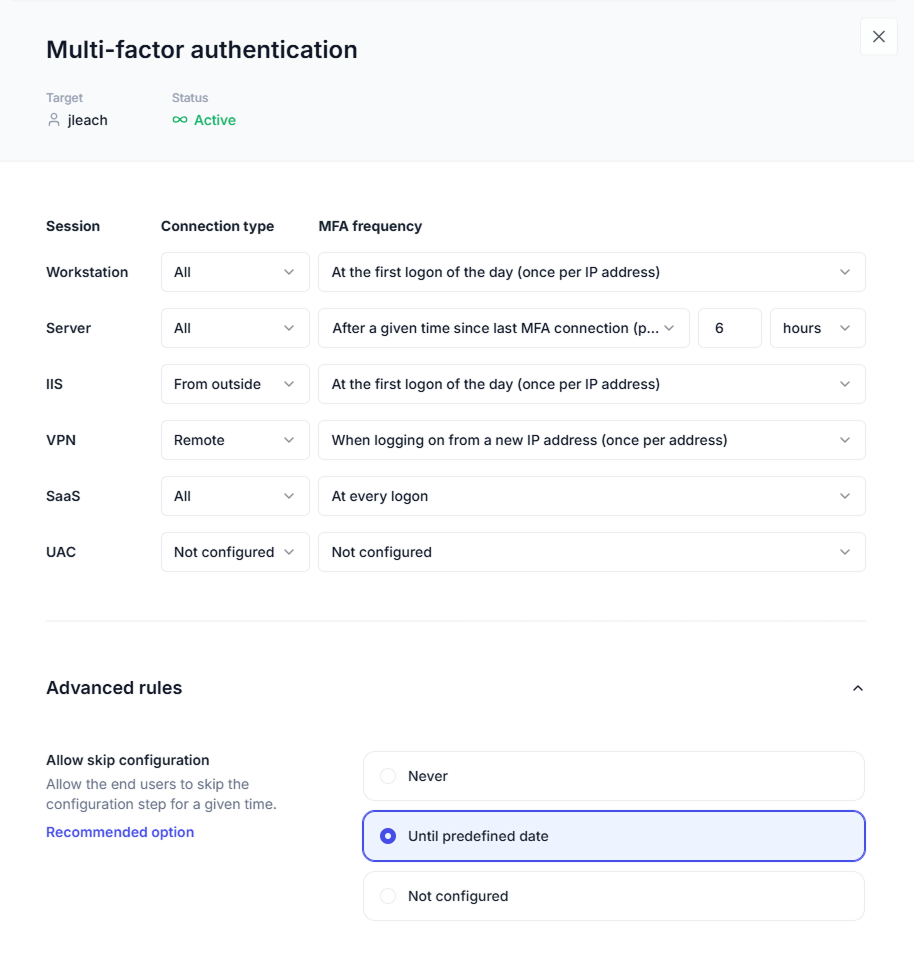
This ability to implement the technology in a sympathetic, one might even say humane, way addresses the complexity of modern IT environments. It does this with simplicity that cloud systems, which depend on Internet connectivity, can't always support. For example, on unconnected workstations or air-gapped networks.
It also places a layer of access management on user accounts that AD doesn't have. For example, by enforcing privilege limits on certain users or groups, as well as putting in place real-time monitoring and alerting to detect anomalous behavior.

Through UserLock, admins gain important visibility on how AD accounts are interacting with the directory and accessing the network.
Granted, UserLock doesn't and can't mitigate every risk. For instance, it can't compensate for NTLM's vulnerability, or attacks that try to exploit its replacement, Kerberos.
It is a platform for hardening identity management and not a simple security fix. The point of implementing an identity security overlay such as UserLock is that it works best when used in conjunction with other security add-ons such as LAPs, ADCS, Group Managed Service Accounts, and the wide variety of open-source tools available.
Active Directory security is always evolving. Teams tasked with hardening Active Directory will always need to adapt to changing tactics and new escalation paths. Treat the steps in this article as a starting point: audit regularly, test your assumptions, and close gaps systematically.